A table consists of several row variables and several column variables. Each variable in a table can have a different data type and size, but there is one restriction: each variable must have the same number of rows.
Creating Tables
Use the table function to create a table based on existing variables, or use the readtable function to create a table based on a file.
Use the table function to create a table based on existing variables, or use the readtable function to create a table based on a file.
1. Creating a Table from Workspace Variables
[Example 2-68]
First create workspace variables with the same number of rows.
ID = {'1';'2';'3';'4'};
Name = {'张三';'李四';'杨二';'王五'};
Age = [18;19;17;20];
Height = [162;169;164;167];
Weight = [116;103;131;133];
Then use the table function to create the table. Use the 'RowNames' name-value pair below to specify the row names as the values of ID.
T=table(Name,Age,Height,Weight, 'RowNames',ID)
T =
            Name    Age    Height    Weight
            ____    ___    ______    ______
    1      '张三'    18     162       116
    2      '李四'    19     169       103
    3      '杨二'    17     164       131
    4      '王五'    20     167       133
2. Creating Table Content and Specifying Variable Names
[Example 2-69]
First create the content of the table, then use the 'VariableNames' name-value pair to specify the variable names.
>> T = table(categorical({'张三';'李四';'杨二';'王五'}),{'M';'F';'M';'F'},[18;19;17;25],...
[162;169;164;167],logical([0;0;0;1]),...
'VariableNames',{'Name' 'Gender' 'Age' 'Height' 'Married'})
>> T =
            Name    Gender    Age    Height    Married
            ____    ______    ___    ______    _______
    张三     'M'      18     162       false
    李四     'F'      19     169       false
    杨二     'M'      17     164       false
    王五     'F'      25     167       true
3. Creating a Table Using Object Reference
[Example 2-70]
This method first creates an empty table object, then specifies variable names and values using object reference.
Enter in the Command Window:
ID = {'1';'2';'3';'4'};
Name = {'张三';'李四';'杨二';'王五'};
Age = [18;19;17;20];
Height = [162;169;164;167];
Weight = [116;103;131;133];
T=table;
T.ID=ID;
T.Name=Name;
T.Age=Age;
T.Height=Height;
T.Weight=Weight
T =
            ID     Name    Age    Height    Weight
            ___    ____    ___    ______    ______
    '1'    '张三'    18     162       116
    '2'    '李四'    19     169       103
    '3'    '杨二'    17     164       131
    '4'    '王五'    20     167       133
4. Creating a Table Using the readtable Function
[Example 2-71]
First use Notepad to create a text file containing table data, as shown in Figure 2-4. Save the file in the examples\matlab subdirectory of the MATLAB installation directory, named demo.dat.
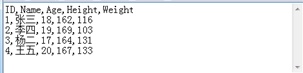
Figure 2-4: Text File Containing Table Data
Enter in the Command Window:
filename = fullfile(matlabroot,'examples','matlab','demo.dat');
T=readtable(filename)
Generate table:
T =
            ID    Name    Age    Height    Weight
            __    ____    ___    ______    ______
    1     '张三'    18     162       116
    2     '李四'    19     169       103
    3     '杨二'    17     164       131
    4     '王五'    20     167       133
Use the writetable function to write the table to a file.
Table Operations and Associations
In MATLAB, you can conveniently perform intersection, difference, exclusive OR (XOR), and union operations on tables.
[Example 2-72]
Create the following two tables.
A = table(categorical({'1';'2';'3';'4'}),{'张三';'李四';'杨二';'王五'},{'M';'F';'M';'F'},[18;19;17;25],...
[162;169;164;167],logical([0;0;0;1]),...
'VariableNames',{'ID' 'Name' 'Gender' 'Age' 'Height' 'Married'})
A =
            ID    Name    Gender    Age    Height    Married
            __    ____    ______    ___    ______    _______
    1     '张三'    'M'       18     162       false
    2     '李四'    'F'       19     169       false
    3     '杨二'    'M'       17     164       false
    4     '王五'    'F'       25     167       true
B = table(categorical({'3';'6';'8';'10'}),{'杨二';'赵旭';'东方允';'夏东'},{'M';'M';'M';'M'},[17;20;18;23],...
[164;159;162;165],logical([0;0;0;1]),...
'VariableNames',{'ID' 'Name' 'Gender' 'Age' 'Height' 'Married'})
B =
            ID    Name     Gender    Age    Height    Married
            __    _____    ______    ___    ______    _______
    3     '杨二'     'M'       17     164       false
    6     '赵旭'     'M'       20     159       false
    8     '东方允'    'M'       18     162       false
    10    '夏东'     'M'       23     165       true
1. Finding the Intersection of Two Tables
Use the intersect function to find the intersection of two tables below.
C=intersect(A,B)
C =
            ID    Name    Gender    Age    Height    Married
            __    ____    ______    ___    ______    _______
    3     '杨二'    'M'       17     164       false
2. Finding the Difference of Two Tables
Use the setdiff function to find the difference of two tables below. The difference of tables A and B is the result of removing the intersection of A and B from A.
C=setdiff(A,B)
C =
            ID    Name    Gender    Age    Height    Married
            __    ____    ______    ___    ______    _______
    1     '张三'    'M'       18     162       false
    2     '李四'    'F'       19     169       false
    4     '王五'    'F'       25     167       true
3. Finding the Union of Two Tables
Use the union function to find the union of two tables below.
C=union(A,B)
C =
            ID    Name     Gender    Age    Height    Married
            __    _____    ______    ___    ______    _______
    1     '张三'     'M'       18     162       false
    2     '李四'     'F'       19     169       false
    3     '杨二'     'M'       17     164       false
    4     '王五'     'F'       25     167       true
    10    '夏东'     'M'       23     165       true
    6     '赵旭'     'M'       20     159       false
    8     '东方允'   'M'       18     162       false
4. Finding the Exclusive OR (XOR) of Two Tables
Use the setxor function to find the exclusive OR of two tables below. The result of the XOR operation on two tables is the data not in the intersection of the two tables, excluding duplicates.
C=setxor(A,B)
C =
            ID    Name     Gender    Age    Height    Married
            __    _____    ______    ___    ______    _______
    1     '张三'     'M'       18     162       false
    2     '李四'     'F'       19     169       false
    4     '王五'     'F'       25     167       true
    10    '夏东'     'M'       23     165       true
    6     '赵旭'     'M'       20     159       false
    8     '东方允'   'M'       18     162       false
Table Conversion
Use the array2table and table2array functions to convert between tables and arrays.
[Example 2-73]
For array A:
A=[1 2 3;4 5 6;7 8 9]
A =
     1     2     3
     4     5     6
     7     8     9
Use the array2table function to convert array A to a table.
T=array2table(A)
T =
    A1    A2    A3
    __    __    __
     1     2     3
     4     5     6
     7     8     9
For table T:
T = table([1;2;3],[2 5; 6 9; 6 10], 'VariableNames',{'One' 'Two'})
T =
    One      Two
    ___    _______
     1      2     5
     2      6     9
     3      6    10
Use the table2array function to convert table T to an array.
A=table2array(T)
A =
     1     2     5
     2     6     9
     3     6    10
Functions for converting between tables, timetables, structures, and cell arrays are shown in Table 2-11.
Table 2-11: Functions for Converting Between Tables, Timetables, Structures, and Cell Arrays
| Function | Description |
|---|---|
| cell2table | Convert cell array to table. |
| struct2table | Convert structure to table. |
| table2cell | Convert table to cell array. |
| table2struct | Convert table to structure. |
| timetable2table | Convert timetable to table. |
| table2timetable | Convert table to timetable. |
A=table2array(T)
A =
     1     2     5
     2     6     9
     3     6    10
Functions for converting between tables, timetables, structures, and cell arrays are shown in Table 2-11.