MATLAB provides many internal mathematical functions, including abs, sqrt, exp, and sin, etc. Taking the square root or logarithm of a negative number does not cause an error; MATLAB automatically returns complex calculation results. MATLAB also provides many advanced mathematical functions, including bessel and gamma functions, etc. Most of these functions accept complex parameters. Enter the following command in the Command Window to view the list of such functions:
help elfunEnter the following command line to find more advanced mathematical functions and matrix functions:
help specfun
help elmat
Some functions, such as sqrt and sin, are built-in functions. Built-in functions are part of the MATLAB kernel, so their computational efficiency is very high, but details of the calculation cannot be obtained. Other functions, such as gamma and sinh, are implemented using M-files. Built-in functions differ from other functions in that, for example, you cannot see the code for built-in functions; for other functions, you can see the code and even modify it.
Primary Function
The first function in any M-file is called the primary function. There can be any number of subfunctions after the primary function.
In most cases, the primary function is the only function in the M-file that can be called from the MATLAB command line or from another M-file function. When calling this function, use the name of the M-file that defines the function.
[Example 3-6] The average function located in the file average.m is as follows:
function y = average(x)
% Calculate the average of vector elements
y = sum(x)/length(x);
You can calculate the average of 3 numbers using the following MATLAB command line:
average([12 60 42])Note: Generally, the primary function name should be the same as the M-file name. If the primary function name is different from the file name, you must call the primary function using the file name.
Subfunctions
An M-file can contain more than one function. Functions in an M-file other than the primary function are called subfunctions, and they are only visible to the primary function or other subfunctions in the same file.
Place the primary function at the top, subfunctions below, and the order among subfunctions does not matter.
[Example 3-7]
The subfunctions mean and median are used to calculate the mean and median of the input data. The primary function newstats determines the length of the parameter list and calls the subfunctions, passing the list length n to them.
function [avg, med] = newstats(u) % Primary function
% This function uses built-in functions to calculate mean and median
n = length(u);
avg = mean(u, n);
med = median(u, n);
function a = mean(v, n)          % Subfunction
% Calculate mean
a = sum(v)/n;
function m = median(v, n)        % Subfunction
% Calculate median
w = sort(v);
if rem(n, 2) == 1
    m = w((n+1) / 2);
else
    m = (w(n/2) + w(n/2+1)) / 2;
end
Even within the same M-file, subfunctions cannot access parameters used by the primary function or other subfunctions unless they are declared as global variables or passed as parameters.
When calling a function from inside an M-file, MATLAB first checks the file to see if the function is a subfunction. Then it checks for a private function with that name, and finally searches for standalone M-files or built-in functions on the path. Because subfunctions are checked first, you can override an existing M-file with a subfunction of the same name.
Anonymous Functions
Using anonymous functions, you can quickly create simple functions without creating an M-file. Anonymous functions can be created in the MATLAB command line, or in any M-file function or script.
The syntax format for creating an anonymous function is:
fhandle = @(arglist) exprHere, expr represents the function body, i.e., the code that does the main work of the function; arglist is a comma-separated list of input parameters to be passed to the function. The result returns the function handle fhandle.
[Example 3-8]
This example first defines an anonymous function and uses the fplot function to plot the graph of the function.
a = 1.3;   b = .2;   c = 30;
parabola = @(x) a*x.^2 + b*x + c;
fplot(parabola, [-25 25])
The result is shown in Figure 3-2.
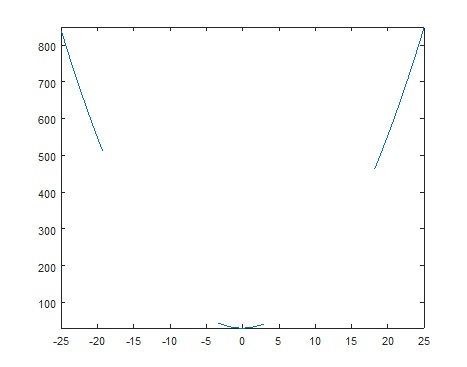
Figure 3-2
Nested Functions
You can nest the definition of one or more functions within a function. A nested function has a form similar to the following:
function x = A(p1, p2)
...
    function y = B(p3)
    ...
    end
...
end
Note: M-file functions generally do not require end statements, but end statements are needed when using nested functions. If an M-file contains one or more nested functions, you must terminate all functions in the M-file with end statements, regardless of whether they contain nested functions.
When calling a nested function, you can call it from the immediately enclosing function, from functions at the same level within the same parent function, or from any lower-level function. For example, in the nested functions below, function A can call function B or function D, but cannot call function C or function E; function B can call function D, and function D can call function B; function C can call function B or function D, but cannot call function E.
function A(x, y)              % Primary function
    B(x, y);
    D(y);
    function B(x, y)           % Nested in function A
        C(x);
        D(y);
        function C(x)           % Nested in function B
            D(x);
        end
    end
    function D(x)              % Nested in function A
        E(x);
        function E              % Nested in function D
            ...
        end
    end
end
Private Functions
Private functions are functions in a private subdirectory. They are only visible to functions in the parent directory. For example, suppose the directory newmath is on the MATLAB search path; then functions contained in the private subdirectory of the newmath directory can only be called by functions in the newmath directory.
Because private functions are invisible outside the parent directory, you can use the same names in other directories.
Overloaded Functions
Sometimes the same function can be used in multiple situations, corresponding to different input parameters. In such cases, overloaded functions are used. For example, the plot function for drawing 2D line graphs has multiple overloaded forms, two of which are shown below.
plot(Y)
plot(X1, Y1, ...)
These two functions have the same function name but different parameters. When calling the plot function, MATLAB will automatically choose which one to use based on the function's parameters.